Dashboard

ElderCare+ (Remote Patient Monitoring & Caregiver Dashboard)

A healthcare monitoring platform designed to help caregivers track patient vitals, medication adherence, emergency alerts, and doctor appointments through a centralized monitoring dashboard.

Healthcare DashboardPatient MonitoringCaregiver PlatformSaaS HealthcareMedical AlertsPatient AnalyticsHealth Monitoring
ElderCare+ (Remote Patient Monitoring & Caregiver Dashboard) - UI/UX design case study by Saurabh Pansari

1. Project Hero

🚀 Remote Patient Monitoring Platform

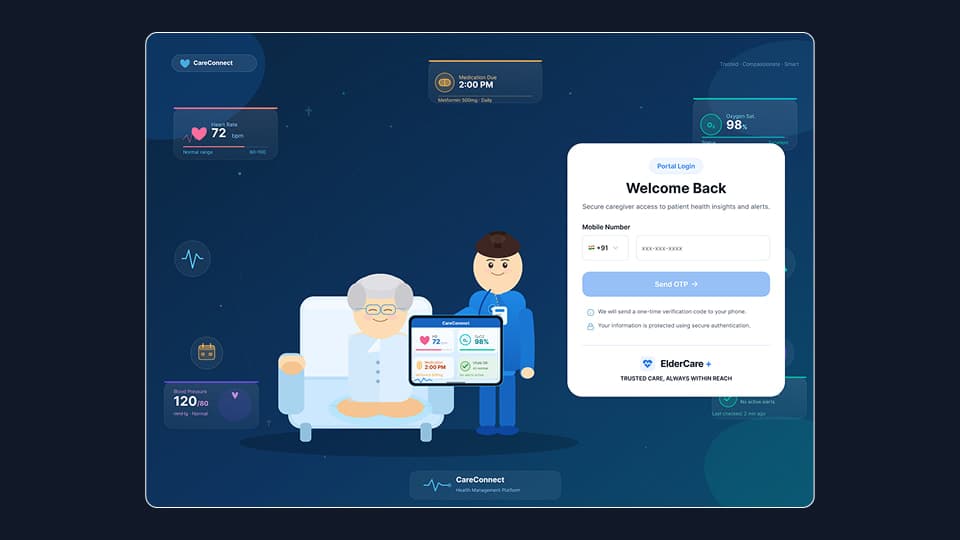
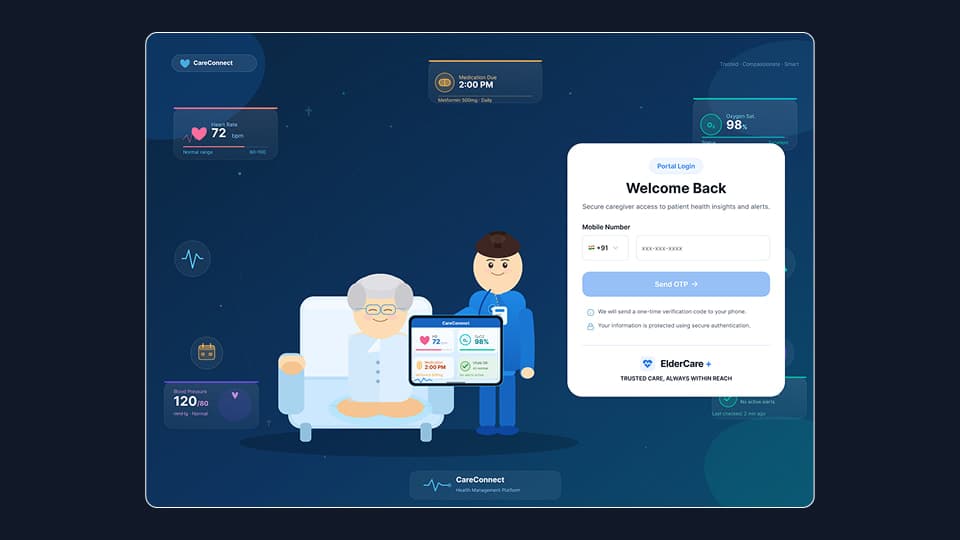
ElderCare+ is a caregiver-focused healthcare monitoring platform designed to provide real-time visibility into the health status of elderly patients.

Caregivers often manage multiple responsibilities including medication schedules, doctor visits, and monitoring chronic health conditions. Without a centralized system, this information is typically scattered across reports, wearable device data, and manual reminders.

ElderCare+ was designed as a health monitoring control center where caregivers can track patient health, detect abnormal readings early, and respond quickly to medical emergencies.

The platform combines patient vitals, medication schedules, health alerts, and appointment management into a single interface.

Core Platform Capabilities

• Real-time patient health monitoring
• Automated health alerts for abnormal readings
• Medication adherence tracking
• Doctor appointment management
• Patient health analytics and reports

By simplifying complex medical data into intuitive dashboards, the platform helps caregivers make faster and more informed healthcare decisions.
2. Project Overview

📊 Product Overview

ElderCare+ is a healthcare SaaS platform designed to assist caregivers in monitoring the health status of elderly patients remotely.

Many elderly individuals suffer from chronic conditions such as hypertension, diabetes, or cardiovascular diseases that require continuous monitoring. Caregivers often struggle to maintain visibility over patient health metrics without reliable digital tools.

The platform aggregates health data from multiple sources and presents it through structured dashboards.

Primary Product Functions

• Monitoring patient vital signs
• Managing daily medication schedules
• Detecting abnormal health conditions
• Tracking doctor appointments
• Generating health reports for medical consultations

The system was designed to transform raw health data into clear, actionable insights for caregivers and healthcare professionals.

3. Problem Statement

⚠️ Problem Statement

Caregivers responsible for elderly patients often face difficulties managing and monitoring patient health effectively.

Key issues identified during product discovery included fragmented health data, missed medications, delayed responses to health emergencies, and limited visibility into long-term health trends.

Without a centralized monitoring platform, caregivers must rely on manual tracking methods that increase the risk of medical complications.

Major Challenges

• Health information scattered across different systems
• Missed medication schedules
• Delayed detection of abnormal vital signs
• Lack of centralized patient monitoring tools
• Difficulty interpreting medical data for non-medical users

These issues highlighted the need for a platform that could centralize patient health information and provide proactive alerts.

4. Goals & Objectives

🎯 Design Goals & Objectives

The primary objective of ElderCare+ was to create a healthcare monitoring system that enables caregivers to proactively manage patient health.

The product needed to simplify complex medical data while ensuring caregivers could quickly detect health risks and respond accordingly.

Product Goals

• Enable real-time monitoring of patient health
• Improve caregiver awareness of patient conditions
• Reduce missed medication events
• Detect abnormal vital signs early
• Provide a centralized platform for patient management

UX Success Criteria

• Caregivers should understand patient health status in under 10 seconds
• Critical alerts should be immediately visible
• Medication adherence should be easy to track

The design approach prioritized clarity, urgency communication, and simplified medical data visualization.

5. Target Users

👥 Target Users

The platform was designed to support several healthcare stakeholders involved in patient care.

Each user group interacts with the system differently depending on their responsibilities.

Primary Users

Family Caregivers

• Monitor patient health status
• Receive alerts for abnormal health readings
• Track medication adherence
• Manage doctor appointments

Healthcare Providers

• Review patient health reports
• Monitor long-term health trends
• Evaluate medication adherence

Patients

• Benefit from continuous health monitoring
• Receive faster medical intervention when needed

The design prioritized simplicity for caregivers while maintaining medical accuracy for healthcare professionals.

6. Product Modules / Features

🧩 Core Product Modules

The ElderCare+ platform was structured into modular healthcare management features.

Each module focuses on a specific aspect of patient monitoring and care management.

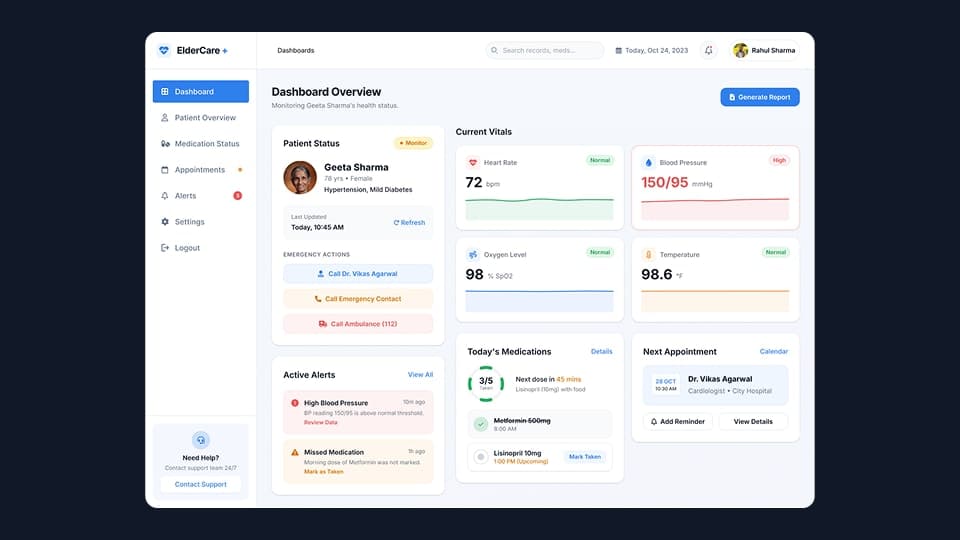
Patient Monitoring Dashboard

Displays real-time patient vitals including:

• Heart rate
• Blood pressure
• Oxygen levels
• Body temperature

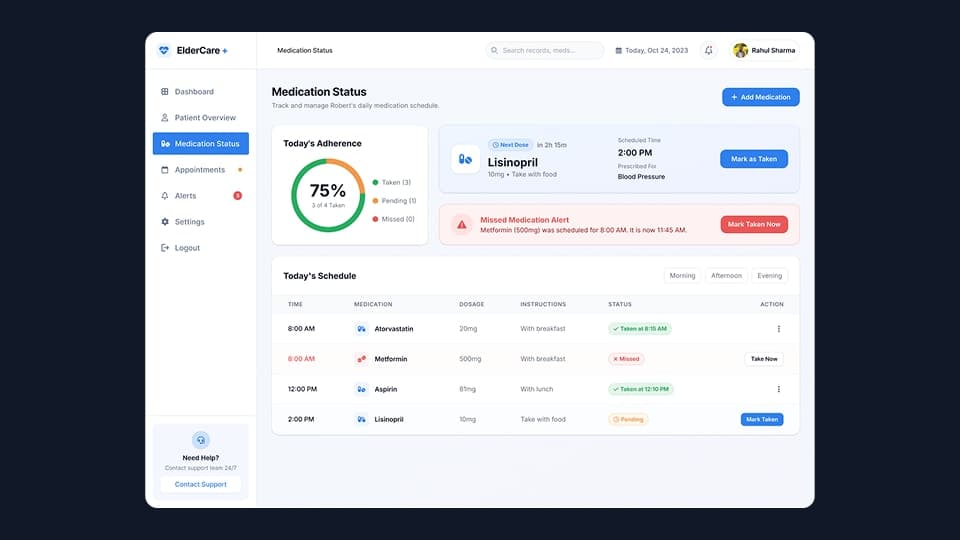
Medication Management

Tracks daily medication schedules and adherence.

Features include:

• Medication reminders
• Missed medication alerts
• Medication intake confirmation

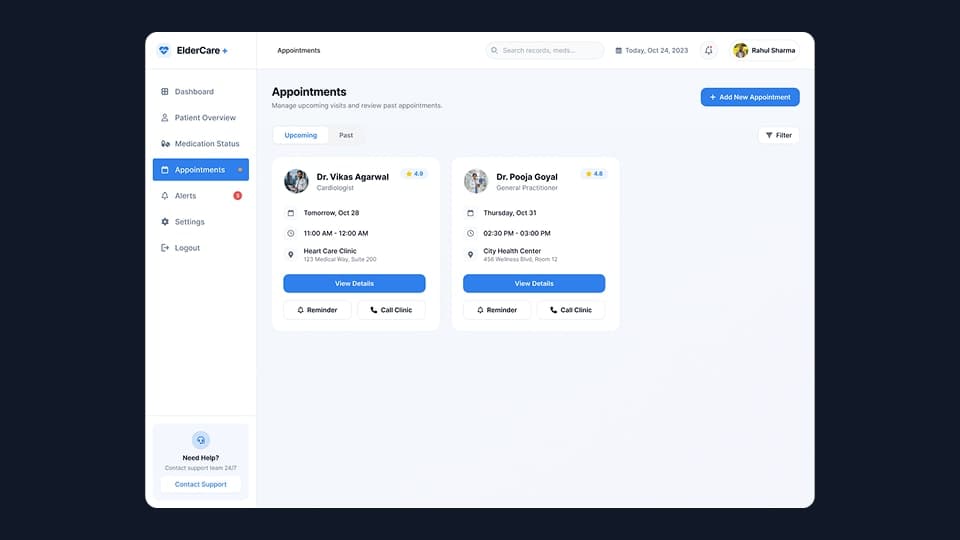
Appointments Management

Allows caregivers to schedule and manage doctor visits.

Capabilities include:

• Appointment scheduling
• Upcoming appointment reminders
• Past appointment history

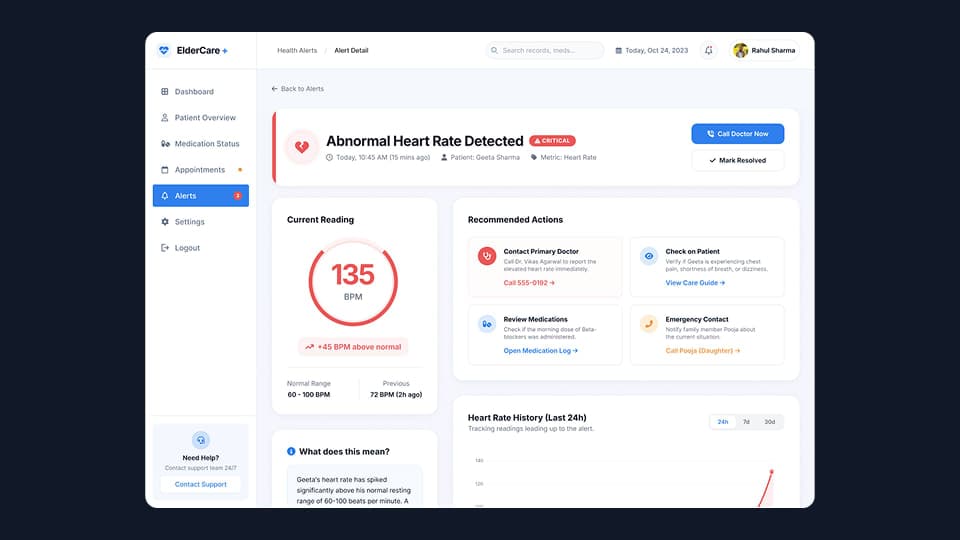
Health Alerts System

Automatically detects abnormal health conditions and generates alerts.

Example alerts include:

• Irregular heart rate
• Low oxygen level
• High blood pressure

These modules enable caregivers to maintain continuous visibility over patient health conditions.

7. Information Architecture

🗂 Information Architecture

The platform follows a structured dashboard architecture optimized for healthcare workflows.

The navigation system ensures caregivers can quickly access important information without cognitive overload.

Primary Navigation Structure

Dashboard
→ Health overview and vital metrics

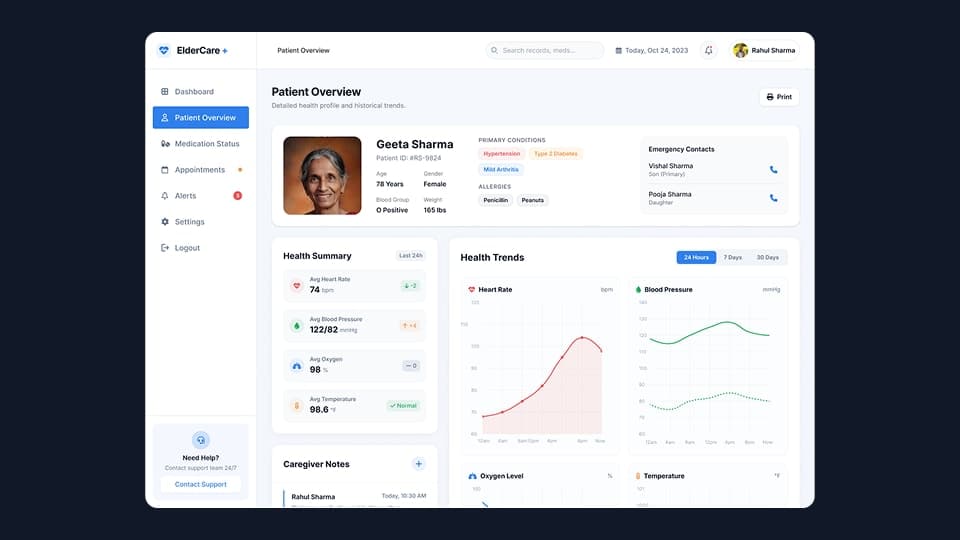
Patient Overview
→ Patient profile and medical history
→ Health trend analysis

Medication Status
→ Medication schedule
→ Adherence tracking

Appointments
→ Upcoming visits
→ Past consultations

Alerts
→ Critical alerts
→ Warning alerts
→ Resolved alerts

Settings
→ Monitoring thresholds
→ Notification preferences

This structure allows users to move seamlessly between monitoring, alerts, and treatment management workflows.

8. Design Process

🎨 Design Process

The product design followed a structured UX workflow tailored for healthcare systems.

1. User Research

Interviews with caregivers revealed several challenges:

• Difficulty interpreting medical metrics
• Anxiety about missing critical health alerts
• Confusion around medication schedules

2. Data Structuring

Health information was organized into four main categories:

• Patient monitoring
• Medication management
• Appointment scheduling
• Emergency alerts

3. Wireframing

Low-fidelity wireframes were created in Figma to test dashboard layouts and information hierarchy.

Focus areas included:

• Vital metrics visibility
• Alert prominence
• Medication workflow clarity

4. Visual Design

The final interface emphasized:

• Calm healthcare color palettes
• Clear typography hierarchy
• Card-based dashboard layout

5. Usability Validation

The interface was tested to ensure caregivers could quickly identify:

• Critical health alerts
• Upcoming medications
• Next doctor appointments

9. Data Visualization Strategy

📈 Data Visualization Strategy

Healthcare dashboards require extremely clear visualizations to help caregivers interpret health conditions quickly.

The design used simple and intuitive charts to communicate patient health trends.

Visualization Principles

• Highlight abnormal readings instantly
• Show health trends over time
• Use color-coded status indicators

Chart Types Used

Line Charts

• Heart rate trends
• Blood pressure history

Metric Cards

• Current vital readings
• Health status indicators

Circular Progress Charts

• Medication adherence percentage

Alert Cards

• Highlight abnormal health readings

Charts were implemented using Chart.js, enabling responsive and real-time health data visualization.

10. Key Screens

🖥 Key Product Screens

Several core screens were designed to support the caregiver workflow.

Dashboard Overview

Displays key patient health metrics including:

• Heart rate
• Blood pressure
• Oxygen level
• Temperature

Patient Overview

Provides patient profile information and long-term health trends.

Medication Management

Displays medication schedules and adherence status such as:

• Taken
• Pending
• Missed

Health Alerts

Highlights abnormal health events requiring immediate caregiver attention.

Appointments Management

Allows caregivers to manage doctor visits and track appointment history.

Key Screens 1
Key Screens 2
Key Screens 3
Key Screens 4
Key Screens 5
Key Screens 6

11. Design System

🎨 Design System

A modular healthcare design system was created to ensure visual consistency across the platform.

Key UI Components

Dashboard Cards

Used to display health metrics and alerts.

Status Indicators

• Green → Normal
• Yellow → Warning
• Red → Critical

Alert Components

Designed to capture caregiver attention during medical emergencies.

Sidebar Navigation

Provides clear navigation across all platform modules.

Reusable components helped maintain design consistency and scalability across the healthcare system.

12. Design Challenges

Design Challenges

Designing healthcare dashboards requires balancing data clarity with emotional sensitivity.

Major Challenges

Medical Data Complexity

Healthcare metrics are difficult for non-medical users to interpret.

Solution
Simplified visual indicators and trend-based charts.

Alert Fatigue

Too many alerts can overwhelm caregivers.

Solution
Introduced severity levels for alerts.

Emotional Sensitivity

Healthcare interfaces should feel calm and reassuring.

Solution
Used soft color palettes and structured layouts to reduce stress.

13. Key Learnings

📚 Key Learnings

This project provided several insights into designing healthcare platforms.

Key Observations

• Caregivers prefer simplified medical insights over detailed datasets
• Alerts must communicate urgency clearly
• Healthcare dashboards should prioritize readability
• Medical data visualization must support quick decision-making

The project reinforced the importance of designing systems that translate complex medical information into easily understandable insights.

14. Final Outcome

🏁 Final Outcome

ElderCare+ successfully created a centralized health monitoring system for caregivers managing elderly patients.

The platform simplified patient monitoring by bringing vital signs, medication schedules, alerts, and appointments into one unified interface.

Product Impact

• Improved visibility into patient health conditions
• Faster response to medical alerts
• Better medication adherence tracking
• Clear visualization of long-term health trends

The product establishes a scalable foundation for remote healthcare monitoring and proactive patient care.

15. Figma Prototype Embed