App

AAHAAR25 WhatsApp Chatbot

A WhatsApp-based chatbot designed to streamline food ordering and provide real-time assistance for event visitors at AAHAAR25.

Conversational UXChatbot DesignWhatsApp AutomationEvent TechFood Ordering UXAI Interaction Design
AAHAAR25 WhatsApp Chatbot - UI/UX design case study by Saurabh Pansari

1. Project Hero

πŸ€– AAHAAR25 Chatbot

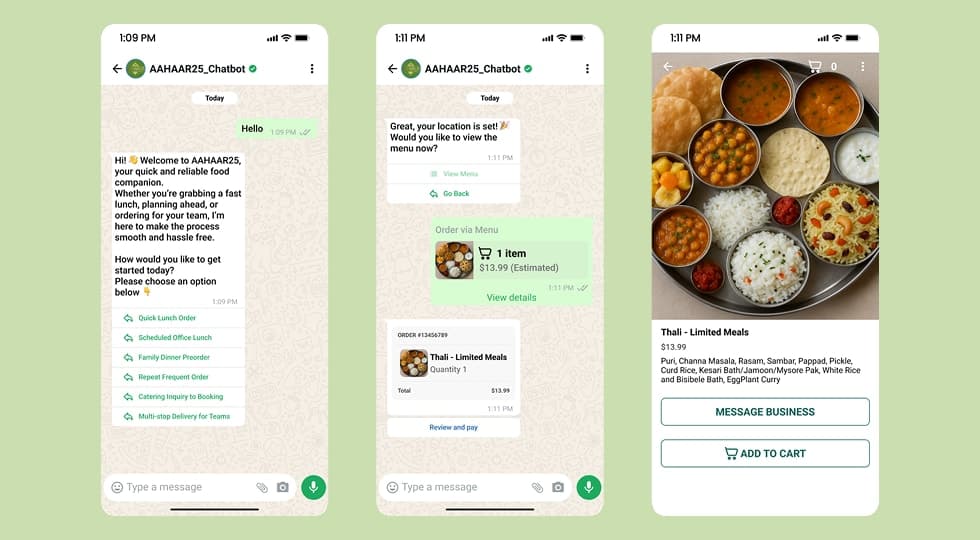
AAHAAR25 Chatbot is a WhatsApp based conversational system designed to simplify food ordering and provide real-time event assistance for visitors.

The chatbot acts as a digital event assistant, helping users navigate the event, explore food options, and place orders seamlessly within WhatsApp.

Instead of downloading multiple apps or waiting in queues, users can interact with a familiar interface to complete tasks instantly.

πŸ‘¨β€πŸ’» My Role

Product Designer

Responsibilities included

β€’ Conversational UX design
β€’ Chatbot flow architecture
β€’ User journey mapping
β€’ Food ordering flow design
β€’ Event assistance automation

πŸ›  Tools

Designed in Figma
Flow mapping using Chatbot Flow Diagrams
2. Project Overview

πŸŽͺ AAHAAR25 is a large-scale event where visitors explore food stalls, exhibitions, and experiences.

However, managing food orders and assisting visitors becomes complex due to crowd volume and fragmented information.

The chatbot was designed as a centralized interaction layer where users can

Browse food options
Place orders
Get event information
Navigate the venue

All within WhatsApp.

This removes friction and improves the overall event experience.

3. Problem Statement

⚠ Event visitors often face challenges during large-scale exhibitions.

πŸ‘€ User pain points

β€’ Long queues at food stalls
β€’ Difficulty finding stalls or menu information
β€’ No centralized platform for event assistance
β€’ Time wasted switching between vendors

β€œI just want to quickly order food without standing in line.”
Event visitor insight

4. Goals & Objectives

🎯 The goal was to create a seamless WhatsApp based assistant for event visitors.

✨ Key goals

β€’ Enable quick food ordering through chat
β€’ Reduce physical queues at stalls
β€’ Provide instant event related assistance
β€’ Use familiar platform to reduce learning curve
β€’ Design scalable chatbot flows for multiple vendors

5. Target Users

πŸ‘₯ The chatbot was designed for high-footfall event environments.

πŸŽͺ Event Visitors

Need quick access to food and information.

🍽 Food Stall Vendors

Require an efficient system to manage orders.

πŸ§‘β€πŸ€β€πŸ§‘ First Time Visitors

Need guidance for navigation and exploration.

6. Product Thinking

🧠 The chatbot was designed around the idea of zero learning curve interaction.

Instead of building a new app, WhatsApp was chosen because

Users are already familiar with it
No installation is required
Faster adoption in crowded environments

The chatbot acts as a single interface layer between users, vendors, and event services.

7. Chatbot Flow Structure

πŸ’¬ The experience is designed using structured conversational flows.

✨ Interaction model

Quick reply buttons for faster navigation
Minimal typing required
Clear step by step guidance
Context aware responses

The goal was to reduce cognitive load and ensure users can complete tasks within seconds.

8. Chatbot Flow Structure

πŸ—Ί The chatbot flow was structured into key interaction modules.

Entry Point

User initiates chat on WhatsApp

Main Options

Food ordering
Event information
Help & support

Food Ordering Flow

Browse menu
Select items
Add to cart
Confirm order
Payment / pickup details

Assistance Flow

Event navigation
Stall discovery
FAQs
Support queries

9. Food Ordering Experience

🍽 The food ordering flow was designed to be fast and intuitive.

1️⃣ User selects Order Food

2️⃣ Chooses category or stall

3️⃣ Browses menu items

4️⃣ Adds items to cart

5️⃣ Reviews order summary

6️⃣ Confirms order and receives instructions

The flow minimizes steps and reduces waiting time significantly.

10. Key Design Decisions

βš™ Several strategic decisions improved usability.

πŸ“± Platform First Approach

WhatsApp ensures high adoption and accessibility.

⚑ Quick Replies

Users interact using buttons instead of typing.

🧭 Guided Navigation

Clear options reduce confusion in chat flow.

πŸ›’ Simplified Ordering

Minimal steps for completing transactions.

11. Challenges

🚧 Designing chatbot experiences introduces unique challenges.

β€’ Managing multiple conversation paths without confusion
β€’ Keeping interactions short but informative
β€’ Handling user errors and unexpected inputs
β€’ Designing scalable flows for multiple vendors

12. Key Learnings

πŸ’‘ This project highlighted the importance of designing for real-world constraints.

In high crowd environments

Speed is more important than feature richness
Familiar platforms increase adoption
Structured conversations reduce friction

Chatbots require a balance between automation and clarity.

13. Final Outcome

πŸš€ The AAHAAR25 Chatbot transforms event experiences by enabling users to order food and access information instantly through WhatsApp.

By combining conversational UX, automation, and real-time assistance, the system reduces friction, improves efficiency, and enhances visitor satisfaction.

14. Figma Prototype Embed