App

Madex - Student Counselling & Knowledge Platform

Mobile platform connecting students with professional counsellors through chat, calls, and educational resources to support informed academic decisions.

Madex - Student Counselling & Knowledge Platform
Madex - Student Counselling & Knowledge Platform - UI/UX design case study by Saurabh Pansari

1. Project Hero

Madex - Student Counselling & Knowledge Platform

Madex is a mobile platform designed to help students connect with professional counsellors for academic and career guidance. The platform enables users to discover experts, communicate through chat or calls, and access educational resources through an integrated knowledge marketplace.

Role: UI/UX Designer
Platform: Mobile Application
Industry: EdTech / Counselling

2. Project Overview

Madex is an education-focused counselling platform built to help students make better academic and career decisions.

Students often struggle to find reliable guidance when choosing courses, colleges, or career paths. Madex addresses this problem by connecting students with verified counsellors who provide professional advice through chat, voice calls, or video consultations.

In addition to counselling services, the platform includes a knowledge marketplace where students can access educational guides and learning resources.

The platform is designed to support two primary user groups:

• Students seeking counselling and academic guidance
• Professional counsellors offering consultation services

Each user group has its own workflow and interface tailored to their needs.

3. Problem Statement

Many students face uncertainty when making important academic decisions such as selecting courses, choosing universities, or planning their careers.

Access to reliable counselling services is often limited, fragmented, or difficult to find. Students frequently rely on informal advice from peers or online sources that may not always provide accurate guidance.

At the same time, counsellors lack structured platforms where they can efficiently connect with students, manage consultations, and share their expertise.

The challenge was to design a digital platform that simplifies the process of discovering counsellors, scheduling consultations, and accessing educational resources while maintaining a seamless user experience.### Problem Statement

Many students face uncertainty when making important academic decisions such as selecting courses, choosing universities, or planning their careers.

Access to reliable counselling services is often limited, fragmented, or difficult to find. Students frequently rely on informal advice from peers or online sources that may not always provide accurate guidance.

At the same time, counsellors lack structured platforms where they can efficiently connect with students, manage consultations, and share their expertise.

The challenge was to design a digital platform that simplifies the process of discovering counsellors, scheduling consultations, and accessing educational resources while maintaining a seamless user experience.
4. Goals & Objectives

The main goal of Madex was to create a user-friendly platform where students can easily connect with professional counsellors and access valuable educational resources.

Key objectives included:

• Simplify the discovery of counsellors
• Enable multiple communication options such as chat, voice, and video calls
• Provide structured onboarding for both students and counsellors
• Create a marketplace for educational content and learning resources
• Provide counsellors with tools to manage consultations and track performance

5. Target Users

Madex is designed for two main user groups.

Students

Students who need guidance related to academic programs, college admissions, and career planning.

These users require access to reliable counselling and educational resources that can help them make informed decisions.

Counsellors

Professional counsellors who provide academic or career guidance to students.

They require tools to manage consultations, communicate with students, and monitor their professional activity on the platform.

6. User Journey

The Madex platform includes structured user flows designed to guide users from onboarding to counselling sessions.

1.User Registration
Users sign up using their mobile number and verify their identity using a passcode.

2.Role Selection
Users choose whether they want to join as a student or a counsellor.

3.Profile Setup
Students enter academic details while counsellors provide professional qualifications and experience.

4.Counsellor Discovery
Students browse counsellors by category, ratings, and consultation fees.

5.Consultation
Students interact with counsellors through chat, voice calls, or video sessions.

6.Knowledge Access
Users can explore and purchase educational guides from the knowledge marketplace.

7. Key Features

Counsellor Discovery

Students can browse counsellors by category, view ratings, and compare consultation fees before choosing an expert.

Communication Tools

The platform supports multiple consultation methods including chat, voice calls, and video calls.

Knowledge Marketplace

Users can access and purchase educational PDFs and guides to support their learning.

Consultation History

Students can view their past counselling sessions and revisit conversations when needed.

Counsellor Dashboard

Counsellors can track their earnings, consultation duration, and number of students they have helped.

8. Information Architecture

The platform is structured into clear sections that simplify navigation and user interaction.

• Home – Overview of counselling categories and suggested counsellors
• Counsellor Discovery – Browse and filter counsellors
• Knowledge Shop – Educational resources and guides
• Chat & Consultation – Communication between students and counsellors
• Order History – Track past consultations
• Profile & Settings – Manage user information

9. Design Process

The design process focused on creating an intuitive experience for both students and counsellors.

Research Understanding student challenges in accessing academic counselling and identifying gaps in existing solutions.

Wireframing Creating wireframes to define the platform structure, onboarding flows, and key user interactions.

UI Design Designing a clean and accessible interface that prioritizes readability and structured navigation.

Prototyping Developing interactive prototypes to simulate real user interactions and refine the experience.

10. Visual Design

The interface uses a clean and modern design style that prioritizes clarity and usability.

Green accent colors represent growth and education, highlighting primary actions such as booking consultations or purchasing resources.

Card-based layouts organize counsellors, educational resources, and session details in a visually structured way.

Clear typography and simple navigation allow users to easily scan information and complete tasks efficiently.

11. Key Screens

Registration & Login
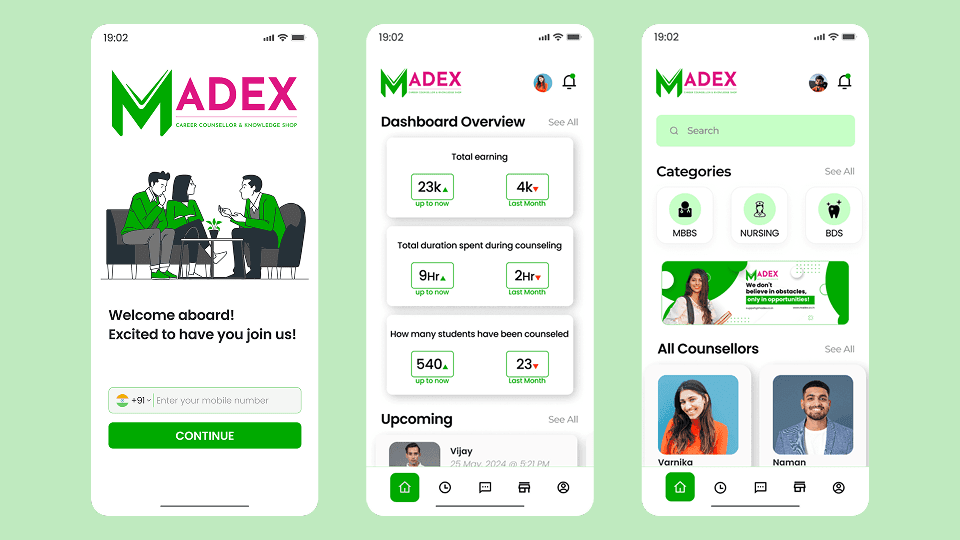
Users register using their mobile number and verify their account with a passcode.

Student Registration
Students complete their profiles by entering academic information and counselling categories.

Counsellor Registration
Counsellors provide professional details such as qualifications, experience, and consultation preferences.

Student Dashboard
Displays counselling categories, counsellor recommendations, order history, and educational resources.

Counsellor Dashboard
Shows key metrics including earnings, counselling duration, and number of students served.

Knowledge Shop
Allows users to browse and purchase educational PDFs and learning materials.

Key Screens 1
Key Screens 2
Key Screens 3
Key Screens 4
Key Screens 5

12. Responsive Design

The Madex platform is designed primarily as a mobile application to ensure accessibility for students and counsellors.

Layouts are optimized for smaller screens while maintaining clear navigation, readable typography, and intuitive touch interactions.

13. Design Challenges

Designing for two different user roles within the same platform required careful planning of workflows and navigation.

Students needed a simple interface focused on discovery and communication, while counsellors required professional tools to manage consultations and performance metrics.

Balancing these needs while maintaining a clean interface was a key design challenge.

14. Key Learnings

This project highlighted the importance of designing structured user flows when building platforms that serve multiple user roles.

Separating student and counsellor experiences helped reduce complexity and improve usability.

The project also demonstrated the value of combining expert counselling with educational resources to create a comprehensive learning ecosystem.

15. Final Outcome

Madex provides a streamlined platform where students can easily access professional academic guidance and educational resources.

The platform simplifies the process of discovering counsellors, scheduling consultations, and accessing learning materials, creating a complete ecosystem for academic decision-making.

16. Figma Prototype Embed