Dashboard

NoSky Backup Platform - Cloud Backup Monitoring Dashboard

Cloud backup monitoring platform designed to help organizations configure automated backups, monitor infrastructure health, and restore critical data through a centralized operational dashboard.

Dashboard DesignEnterprise SaaSProduct DesignData MonitoringInfrastructure ManagementUX StrategyDesign SystemData Visualization
NoSky Backup Platform - Cloud Backup Monitoring Dashboard - UI/UX design case study by Saurabh Pansari

1. Project Hero

🚀 NoSky – Cloud Backup Monitoring Platform

NoSky is an enterprise backup monitoring platform built to help organizations secure their infrastructure data across servers, workstations, and distributed systems.

The platform combines backup agents installed on devices with a centralized cloud monitoring dashboard that allows administrators to configure backups, monitor job performance, and restore files instantly.

Core platform capabilities

• Automated backup configuration
• Real-time infrastructure monitoring
• Backup job tracking and diagnostics
• Secure file restoration
• Storage capacity monitoring

By transforming complex infrastructure workflows into a clear operational interface, the platform enables IT administrators to maintain reliable data protection across large-scale environments.
2. Project Context

📦 Product Context

Modern organizations operate across distributed systems where data is constantly generated across servers, cloud environments, and employee workstations.

Protecting this data requires reliable backup infrastructure and efficient monitoring tools.

However, many backup platforms introduce operational friction because they are designed primarily for system engineers rather than usability.

Key operational challenges

Backup operations are mission-critical, yet the tools managing them often lack clear visibility and actionable insights.

NoSky was designed to bridge this gap by delivering a platform that combines enterprise backup reliability with a user-centered operational dashboard.

3. Problem Statement

⚠️ Problem Statement

Enterprise IT teams manage complex backup environments where multiple systems must be monitored continuously.

Traditional backup tools often fail to provide administrators with clear operational insights.

Common challenges include:

• Complex and technical backup configuration workflows
• Limited visibility into backup success rates
• Difficulty monitoring infrastructure across multiple devices
• Backup failures that go unnoticed until data loss occurs
• Slow recovery processes during system incidents

The challenge was to design a platform that simplifies backup infrastructure management while maintaining the flexibility required for enterprise environments.

4. Product Goals

🎯 Product Goals

The product design focused on simplifying backup operations while ensuring administrators maintain full control over infrastructure workflows.

Primary objectives

• Simplify first-time backup configuration
• Provide real-time visibility into backup operations
• Enable administrators to monitor multiple devices efficiently
• Support fast and reliable file restoration
• Create a scalable dashboard architecture for enterprise infrastructure

Success criteria

✔ Administrators can identify backup failures instantly
✔ Infrastructure health is visible from a single dashboard
✔ Recovery workflows require minimal steps

5. Target Users

👤 Target Users

The platform is primarily used by IT administrators and infrastructure engineers responsible for maintaining backup systems across organizations.

Typical responsibilities

• Monitoring device connectivity and system health
• Configuring automated backup routines
• Investigating backup failures
• Restoring data after system incidents
• Managing storage capacity and backup policies

The interface was designed to support high-responsibility workflows where reliability and speed are critical.

6. UX Strategy

🧭 UX Strategy

The UX strategy focused on transforming infrastructure management into a structured operational workflow.

Three core principles guided the design:

Operational Visibility

Administrators should immediately understand the health of the system when opening the dashboard.

Progressive Complexity

Advanced configuration options appear only when required, preventing cognitive overload.

Action-Driven Interfaces

Each screen highlights actions administrators need to take when issues occur.

7. Design Process

🧠 Design Process

The product design process followed a structured UX workflow.

1. Discovery

Understanding enterprise backup workflows including:

• device onboarding
• backup configuration
• monitoring operations
• recovery workflows

2. Information Architecture

Defining platform modules and navigation structure.

3. UX Workflow Design

Mapping critical operational flows:

• device setup
• backup scheduling
• system monitoring
• restore management

4. Interface Design

Creating a SaaS dashboard layout optimized for operational data.

5. Design System Development

Building reusable components to maintain consistency across the platform.

8. Information Architecture

🗂 Information Architecture

The system architecture was organized around operational modules.

Primary navigation structure

Overview
Devices
Backup Monitoring
Backup Sets
Restore Manager
Storage Overview
Settings

Each module supports a specific operational workflow while maintaining a consistent navigation pattern across the platform.

9. Operational Workflow

Operational Workflow

The platform follows a structured workflow for managing backup infrastructure.

Backup lifecycle

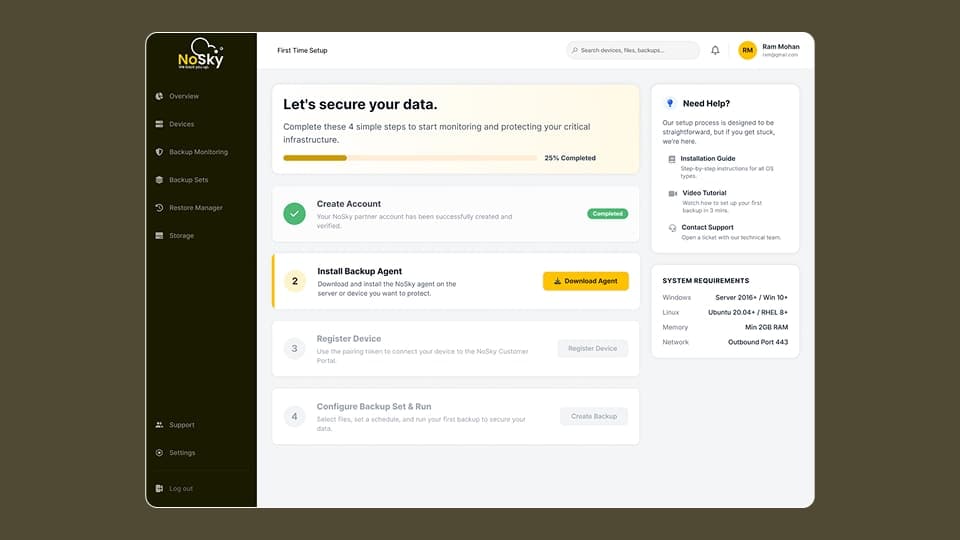
1️⃣ Install backup agent on device
2️⃣ Register device in the platform
3️⃣ Configure backup folders and schedules
4️⃣ Monitor backup job performance
5️⃣ Restore files when needed

This structured flow ensures organizations can secure their data infrastructure with minimal operational friction.

10. Key Screens

🖥 Key Screens

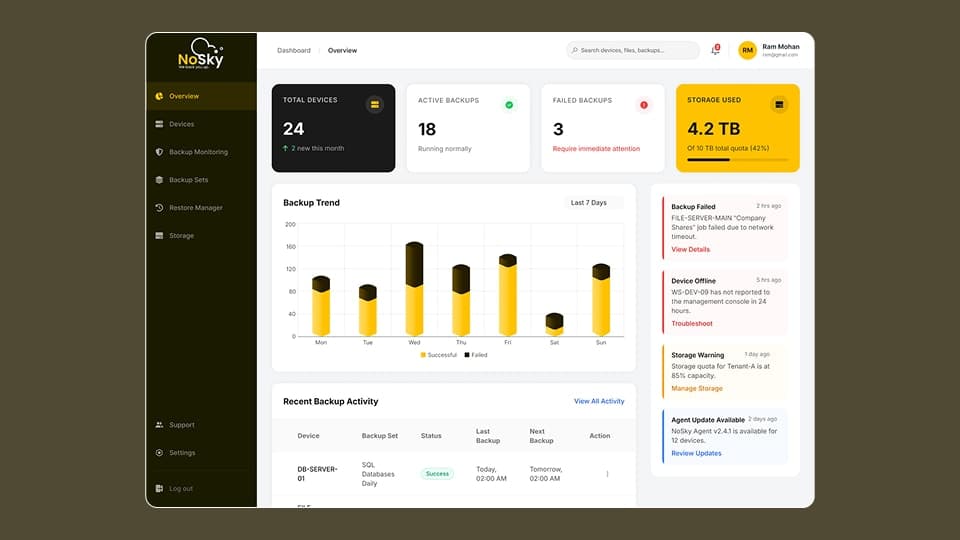
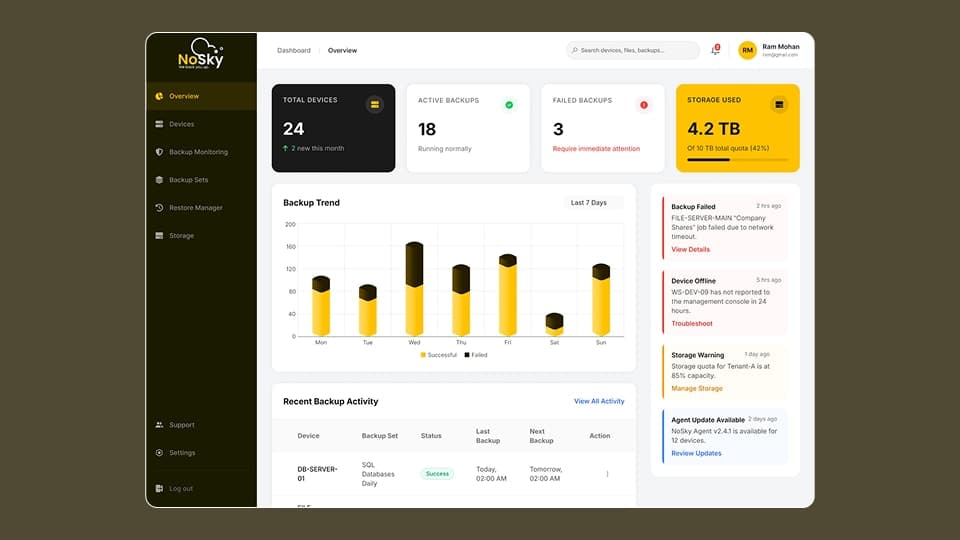
Overview Dashboard

Provides a real-time snapshot of system health including:

• device connectivity
• backup success rates
• failed backup alerts
• storage usage


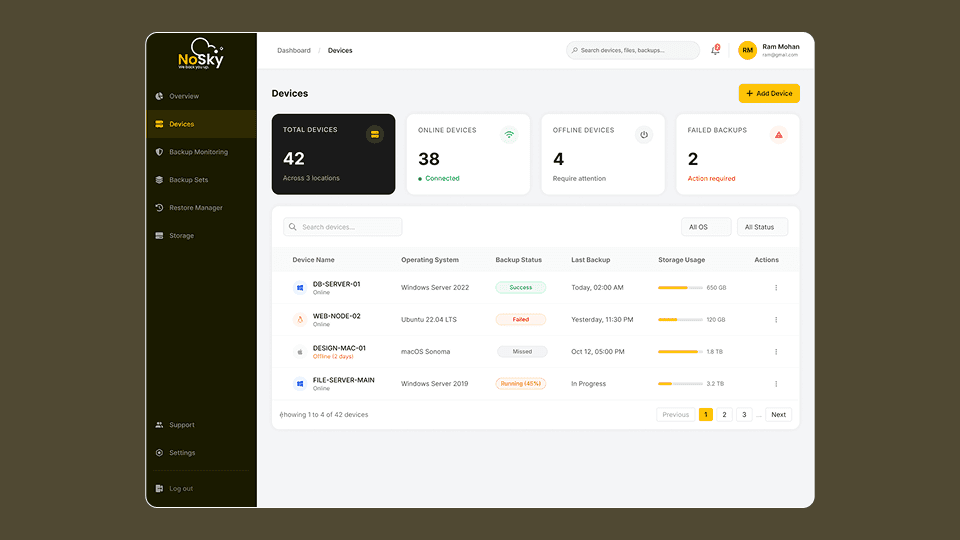
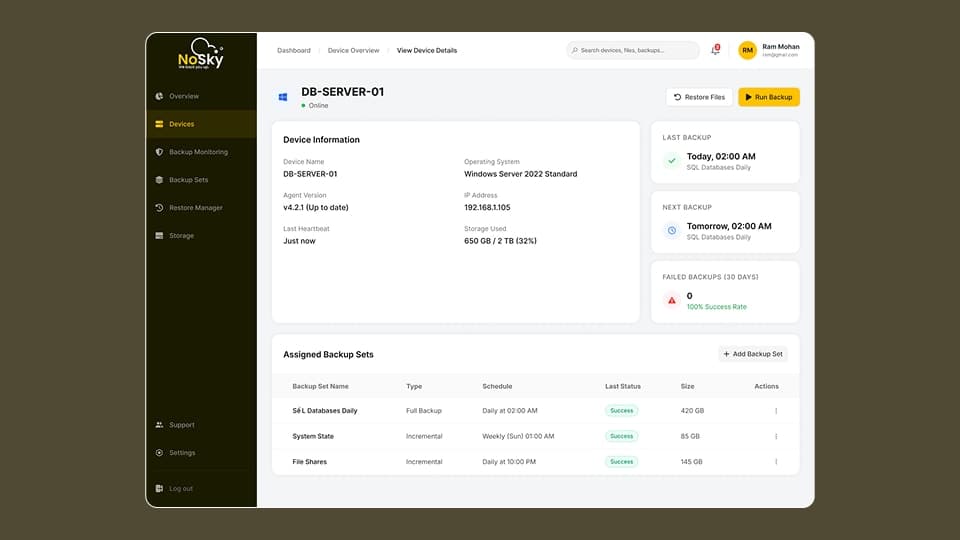
Device Management

Displays all connected devices along with:

• operating system information
• backup status
• storage utilization

Administrators can quickly identify offline systems or infrastructure issues.


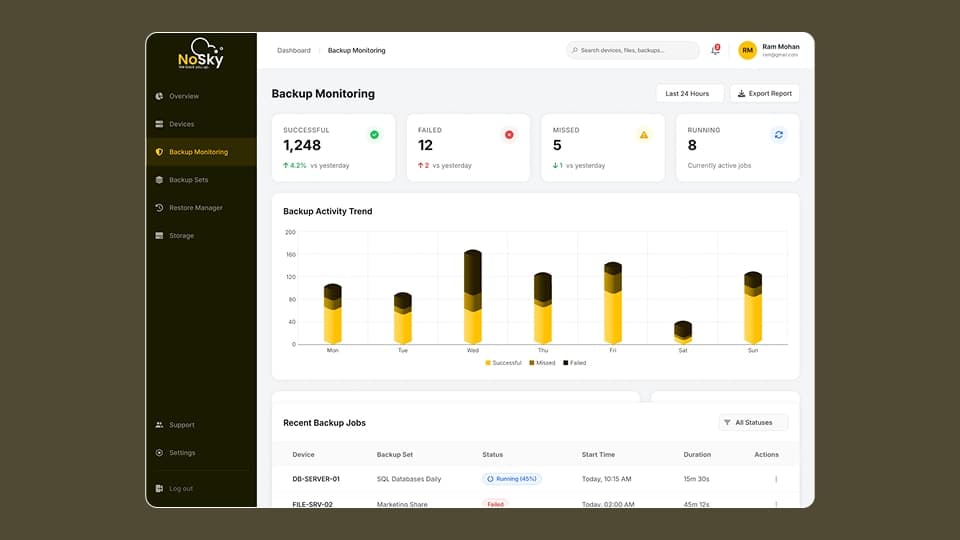
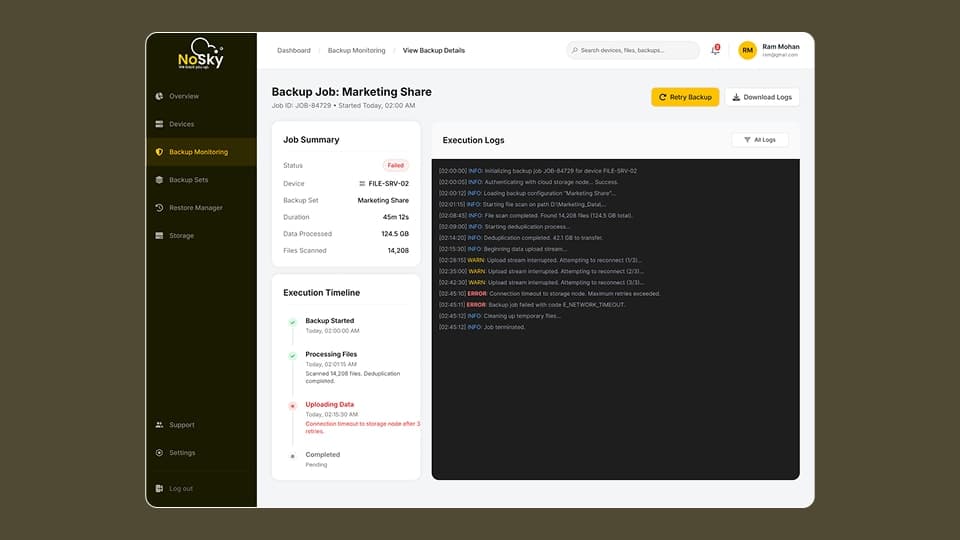
Backup Monitoring

Tracks backup job execution and performance metrics.

Administrators can review backup logs, analyze failure causes, and monitor system activity.


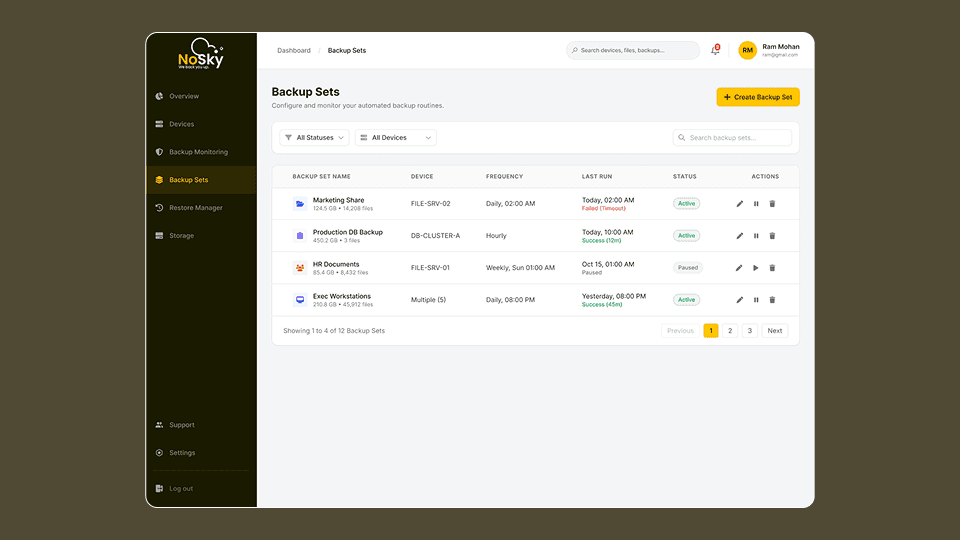
Backup Set Configuration

Allows administrators to define automated backup routines including:

• folder selection
• scheduling frequency
• storage destinations


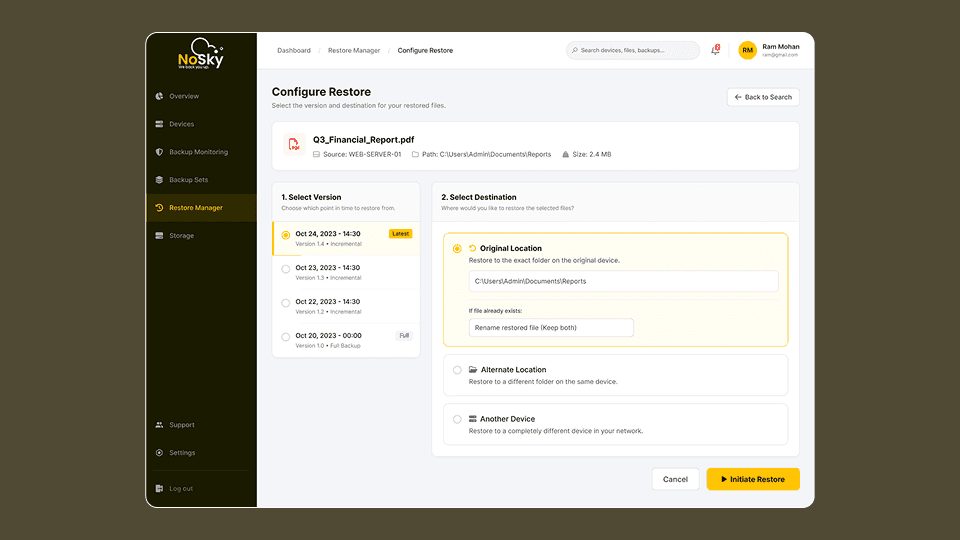
Restore Manager

Enables administrators to search backup history and recover files from historical snapshots.


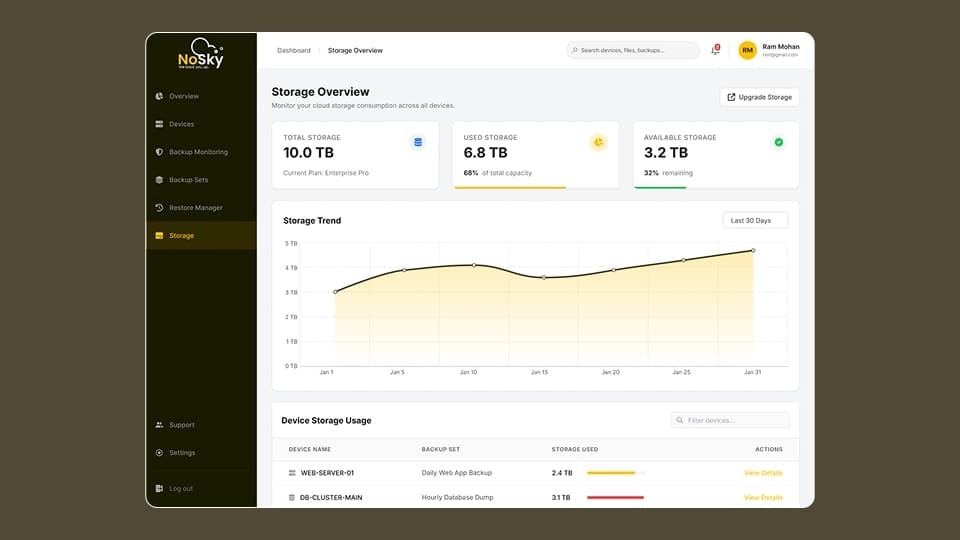
Storage Overview

Displays storage capacity, usage trends, and allocation across infrastructure devices.

Key Screens 1
Key Screens 2
Key Screens 3
Key Screens 4
Key Screens 5
Key Screens 6
Key Screens 7
Key Screens 8
Key Screens 9

11. Design System

🎨 Design System

A scalable design system was created to ensure consistency across the entire platform.

Typography

Primary font: Inter
Optimized for readability in dashboard environments.

Color System

Primary brand color: #FFC200

Semantic colors were used for system states:

• success
• warning
• failure alerts

Component Library

Reusable UI components include:

• navigation menus
• data tables
• dashboard cards
• alerts and notifications
• configuration forms

12. Design Challenges

Design Challenges

Designing enterprise infrastructure tools introduced several challenges.

Data Density

Operational dashboards require presenting large volumes of system data without overwhelming users.

Balancing Simplicity and Control

Administrators require advanced configuration capabilities while still needing intuitive interfaces.

Alert Prioritization

Backup alerts needed clear hierarchy to distinguish between informational messages and critical failures.

13. UX Decisions

💡 UX Decisions

Several design decisions significantly improved platform usability.

Dashboard-First Approach

Operational insights were prioritized on the main dashboard.

Guided Configuration

Backup setup was designed as a step-based workflow.

Table-Driven Monitoring

Devices and backup jobs were displayed using structured tables for fast scanning.

14. Before vs After Improvements

🔄 Before vs After Improvements

Before

• Backup monitoring required multiple tools
• Backup failures were difficult to detect quickly
• Recovery workflows were slow

After

• Centralized operational dashboard
• Real-time infrastructure visibility
• Faster file recovery workflows

15. Product Metrics & Success Indicators

📊 Product Metrics & Success Indicators

Platform success can be measured through operational improvements.

Key metrics include:

• reduction in backup failure resolution time
• faster onboarding of infrastructure devices
• improved system monitoring visibility
• reduced downtime caused by backup failures

16. Impact

📈 Impact

The redesigned platform improved the usability of enterprise backup management by providing administrators with clearer operational insights.

Key improvements

• faster onboarding through guided setup
• improved monitoring visibility
• simplified backup configuration workflows
• faster file recovery during system incidents

17. Key Learnings

📚 Key Learnings

Designing enterprise infrastructure platforms requires balancing technical complexity with usability.

Important insights include:

• monitoring dashboards should prioritize actionable insights
• progressive workflows reduce configuration complexity
• clear system status indicators improve operational awareness

18. Figma Prototype Embed