Dashboard UX Design Best Practices
Dashboards have become an essential part of modern digital products. From SaaS platforms and analytics tools to enterprise management systems, dashboards help users monitor performance, analyze data, and make decisions quickly.
However, designing an effective dashboard is not simply about displaying charts and numbers. Poorly designed dashboards often overwhelm users with too much information or present data in confusing ways.
A well designed dashboard simplifies complexity and highlights the most important insights.
For UX designers, the goal is to create interfaces that allow users to understand data quickly and act on it confidently.
This guide explores the key UX principles and best practices that help designers create effective dashboards.
Understanding the Purpose of a Dashboard
Before designing a dashboard, it is important to understand why the dashboard exists.
Dashboards are created to help users answer important questions about performance or activity.
For example:
- How is the business performing today
- Which metrics require attention
- Are there trends or patterns in the data
- Which areas need improvement
Designers should identify the primary goals of the dashboard and focus on presenting information that supports those goals.
A dashboard should provide insights, not just data.
When dashboards focus on answering user questions, they become much more valuable.
Understanding Dashboard Users
Different users interact with dashboards in different ways.
For example:
- executives want high level summaries
- managers monitor operational performance
- analysts explore detailed data
Designers must understand these different user roles before structuring the dashboard.
User research, stakeholder interviews, and analytics insights can help identify the most important metrics for each role.
Once user needs are clear, designers can prioritize relevant data and avoid unnecessary clutter.
Prioritizing Key Metrics
One of the most common mistakes in dashboard design is displaying too many metrics at once.
When every piece of data appears equally important, users struggle to find meaningful insights.
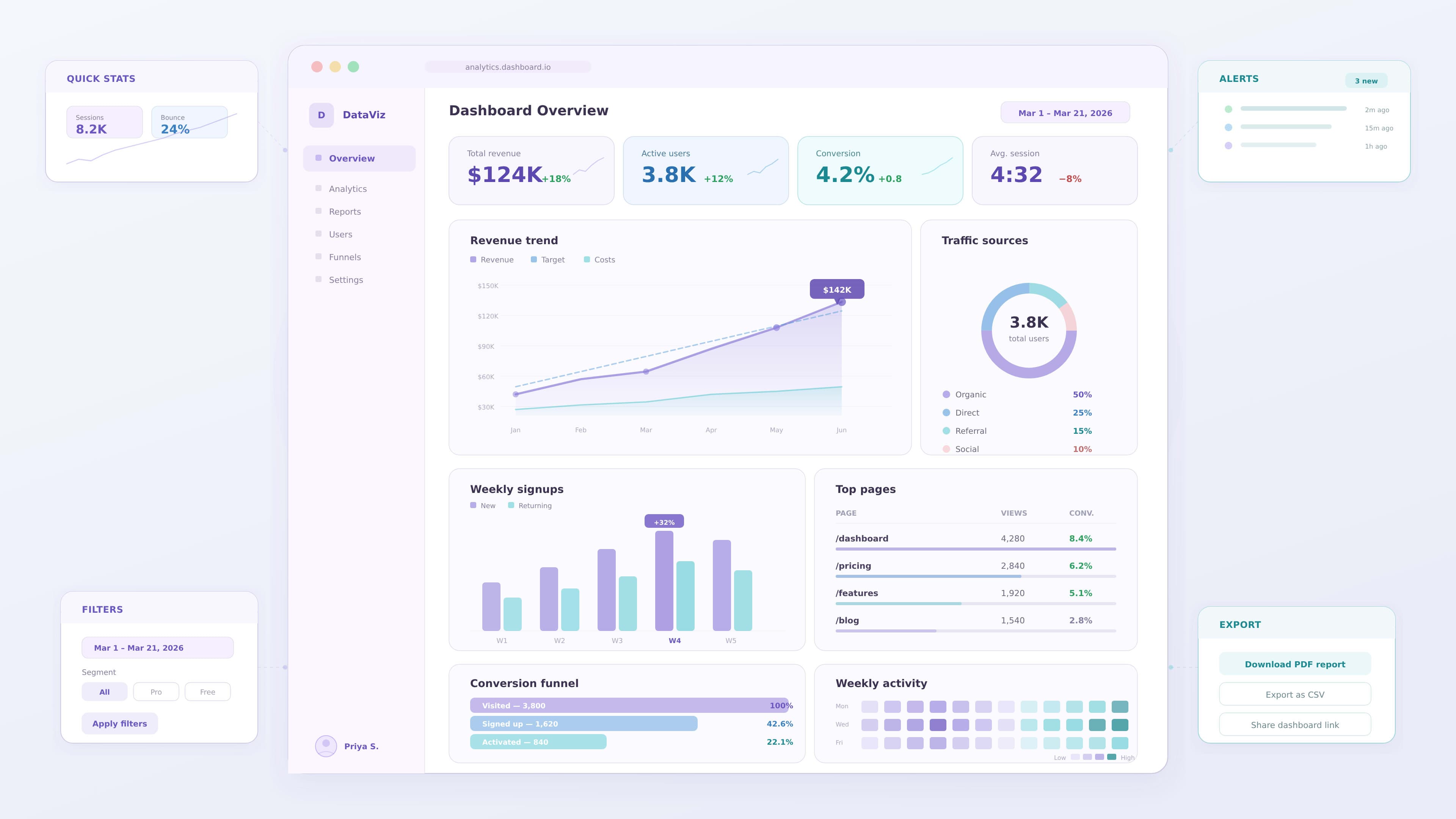
Designers should highlight the most important metrics first.
Common prioritization strategies include:
- displaying key performance indicators at the top
- using larger cards for important metrics
- highlighting significant changes or alerts
- grouping secondary data below primary metrics
Prioritization helps users focus on what matters most.
Designing Clear Data Visualizations
Charts and graphs are central to dashboard interfaces.
However, not every chart type communicates data effectively.
Designers should choose visualization types carefully.
Common visualization patterns include:
- line charts for trends over time
- bar charts for comparing categories
- pie charts for simple proportions
- KPI cards for summary metrics
- tables for detailed data
The goal is to make information easy to interpret at a glance.
Simple visualizations are usually more effective than complex ones.
Creating Strong Visual Hierarchy
Visual hierarchy helps users understand where to focus their attention.
Designers can establish hierarchy using:
- size differences between elements
- color emphasis
- spacing between sections
- layout positioning
For example:
- key metrics may appear as large cards
- supporting charts appear below them
- detailed tables appear further down
This layered structure allows users to move from overview to deeper insights.
Organizing Dashboard Layouts
The layout of a dashboard plays an important role in usability.
A good layout helps users scan information quickly.
Effective layout strategies include:
- placing key metrics at the top
- grouping related charts together
- aligning elements within a grid system
- maintaining consistent spacing
Grid systems help ensure dashboards remain organized and visually balanced.
Supporting Data Exploration
Many dashboard users need to explore data in more detail.
Dashboards should support this through interactive features.
Common interactive features include:
- filters for selecting date ranges
- drill down interactions for deeper analysis
- sorting options for comparing metrics
- tooltips providing additional information
These features allow users to investigate insights without overwhelming the interface.
Reducing Cognitive Load
Dashboards often contain large amounts of information.
Designers should reduce cognitive load so users can interpret data quickly.
Techniques include:
- minimizing unnecessary visual elements
- using clear labels and titles
- maintaining consistent color usage
- avoiding overly complex charts
Reducing cognitive effort helps users focus on insights instead of navigating the interface.
Using Color Effectively
Color is a powerful tool in dashboard design.
It helps highlight patterns, categories, and important changes in data.
However, designers should use color strategically.
Best practices include:
- using a limited color palette
- maintaining consistent color meanings
- highlighting critical metrics with accent colors
- ensuring sufficient contrast for accessibility
Color should guide user attention rather than create visual noise.
Designing for Accessibility
Accessible dashboards ensure all users can interpret data easily.
Accessibility considerations include:
- sufficient color contrast
- readable typography
- clear chart labels
- keyboard navigation support
Designers should also avoid relying only on color to communicate information.
For example, charts may include icons or patterns to support users with color vision deficiencies.
Performance and Data Loading
Enterprise dashboards often handle large datasets.
Poor performance can negatively impact user experience.
Designers should consider strategies that improve performance.
Examples include:
- summarizing data with KPI cards
- allowing users to filter data before loading large datasets
- progressively loading charts and tables
These strategies help dashboards remain responsive.
Example: Improving a Project Management Dashboard
Consider a project management dashboard used by team leaders.
The original dashboard displays multiple charts with equal emphasis.
Users struggle to identify which projects require attention.
A UX designer could improve the dashboard by:
1 highlighting key project metrics at the top
2 grouping related project insights
3 simplifying chart types
4 increasing spacing between sections
These improvements make the dashboard easier to interpret and more useful for decision making.
Common Dashboard Design Mistakes
Even experienced designers sometimes create dashboards that reduce usability.
Common mistakes include:
- displaying too many metrics
- inconsistent chart styles
- unclear labels
- poor visual hierarchy
- excessive use of colors
Avoiding these mistakes improves clarity and usability.
Future Trends in Dashboard UX
Dashboard design continues to evolve as technology advances.
Some emerging trends include:
- real time data dashboards
- AI driven insights
- interactive analytics tools
- advanced visualization libraries
As dashboards become more sophisticated, designers must focus on maintaining clarity and usability.
Key Takeaways
Effective dashboard UX design focuses on clarity, usability, and decision support.
Important best practices include:
- understanding user goals
- prioritizing key metrics
- choosing appropriate data visualizations
- creating strong visual hierarchy
- supporting data exploration
When these principles are applied, dashboards become powerful tools for understanding complex information.
Conclusion
Dashboards are essential tools for modern organizations. UX designers play a critical role in transforming complex datasets into clear and actionable insights.
By focusing on usability, hierarchy, and effective data visualization, designers can create dashboards that help users understand information quickly and make better decisions.