App

GigKaro - Event Discovery & Ticket Booking App

A mobile app that helps users discover concerts, DJ nights, and local events while enabling quick and seamless ticket booking.

Mobile App DesignUI DesignUX DesignEvent DiscoveryTicket BookingEntertainment Platform
GigKaro - Event Discovery & Ticket Booking App - UI/UX design case study by Saurabh Pansari

1. Project Hero

GigKaro is a mobile event discovery and ticket booking platform designed to help users explore concerts, DJ nights, festivals, and local entertainment events happening around them.

The app enables users to easily browse upcoming events, view detailed information, and quickly purchase tickets through a seamless mobile booking experience.

The project focused on designing an engaging entertainment-focused interface while ensuring that event discovery and ticket booking remain fast and frictionless.

Role: UI/UX Designer
Platform: Mobile Application
Industry: Events & Entertainment
2. Project Overview

Attending concerts, DJ nights, and live entertainment events has become increasingly popular, especially among younger audiences.

However, discovering events and booking tickets often involves navigating multiple platforms, which can make the process confusing and time-consuming.

GigKaro was designed to solve this problem by creating a single platform where users can discover events happening nearby, explore categories such as concerts or parties, and book tickets quickly.

The platform focuses on simplifying the discovery journey while delivering a visually exciting experience aligned with the energy of live entertainment.

3. Problem Statement

Users often struggle to find reliable platforms that showcase all nearby entertainment events in one place.

Many ticket booking platforms have cluttered interfaces and complicated booking flows that make the process frustrating.

Additionally, event information such as venue layout, ticket categories, and event highlights are often difficult to understand quickly.

The challenge was to design a platform that allows users to discover events effortlessly and complete ticket bookings in just a few simple steps.

4. Goals & Objectives

The main goal of the project was to create a mobile platform that simplifies event discovery and ticket booking.

The experience needed to allow users to quickly browse events based on their location and interests.

Another objective was to design an engaging interface that captures the excitement and energy of concerts and nightlife events.

The booking process needed to be clear and transparent, allowing users to easily compare ticket categories and purchase tickets without friction.

5. Target Users

The primary users of the platform are young adults and entertainment enthusiasts who frequently attend concerts, DJ nights, and social events.

These users want an easy way to discover upcoming events happening around them and book tickets instantly.

Event organizers and promoters also benefit from the platform by gaining exposure and reaching a wider audience.

6. User Journey

Users start their journey by opening the app and selecting their location to view nearby events.

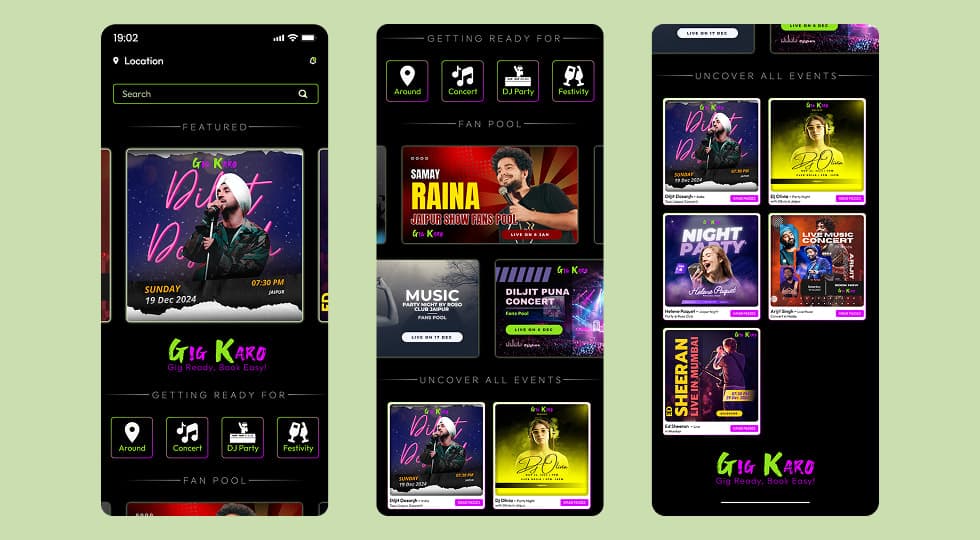
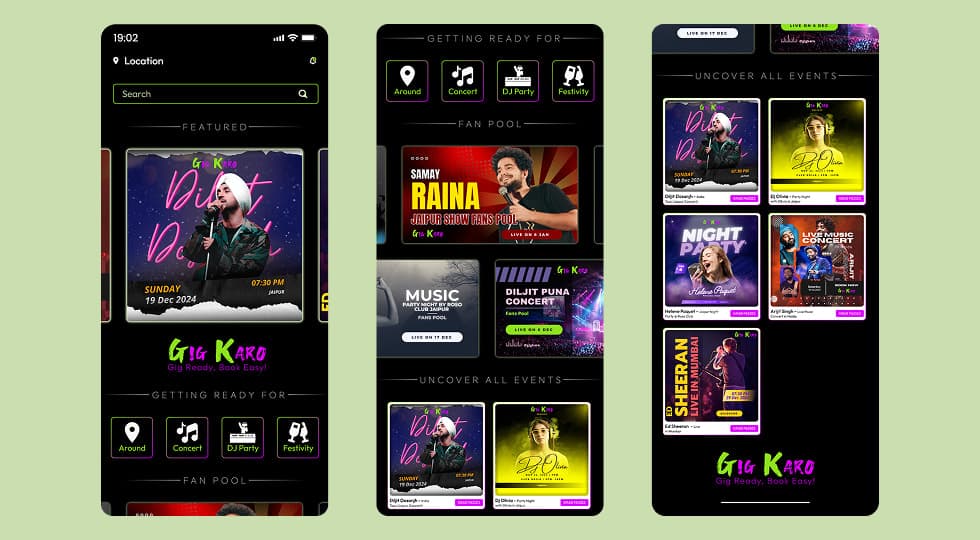
The homepage highlights featured events, trending shows, and category shortcuts such as concerts, DJ parties, and festivals.

Users can browse through event cards and open an event detail page to learn more about the event.

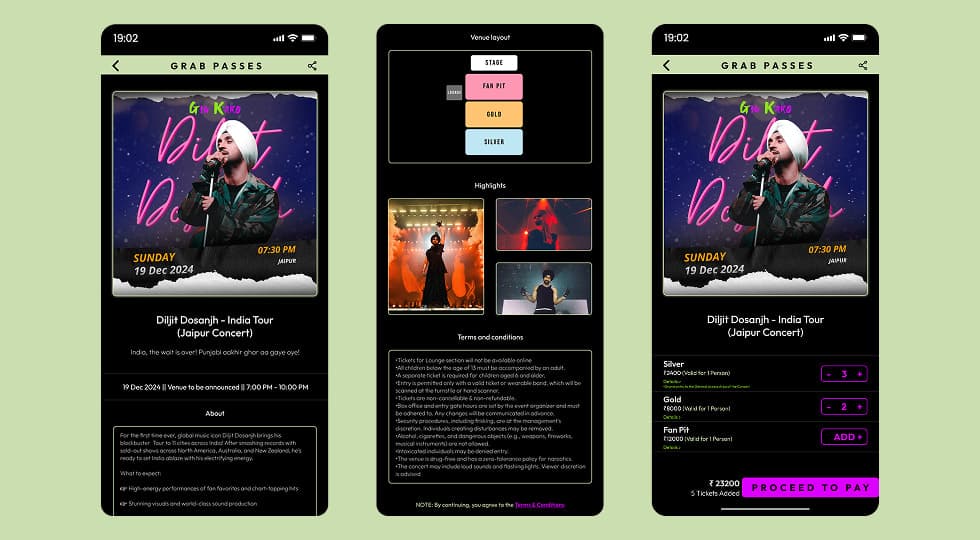
The event page provides information such as date, venue, event highlights, and ticket options.

Users can then select ticket categories, adjust ticket quantities, and proceed to payment to confirm their booking.

7. Key Features

The homepage displays featured concerts and trending events to quickly attract user attention.

Category shortcuts allow users to explore events such as concerts, DJ parties, nightlife events, and local festivals.

The fan pool section highlights popular and upcoming events that users may be interested in.

Event detail pages provide detailed information including event description, highlights, venue layout, and event schedule.

Ticket selection screens allow users to choose ticket categories such as Silver, Gold, or Fan Pit.

A streamlined booking flow enables users to select ticket quantities and proceed directly to payment.

8. Information Architecture

The platform is structured around a clear flow that guides users from discovering events to booking tickets.

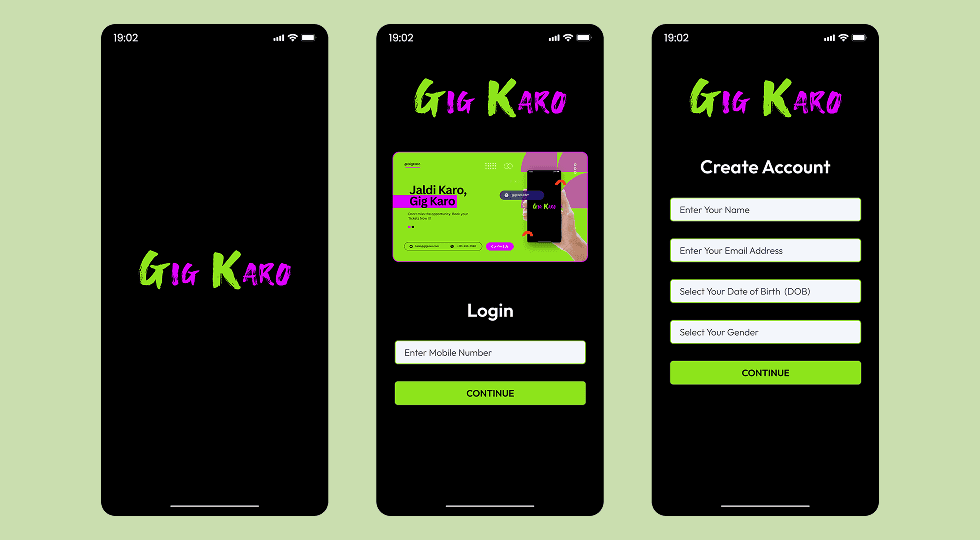
The splash screen introduces the brand and prepares users for the experience.

Authentication screens allow users to sign in using their mobile number and OTP verification.

The homepage showcases featured events, categories, and trending concerts.

Event detail screens display all relevant information about a selected event.

Ticket selection screens allow users to choose ticket types and quantities before completing their booking.

9. Design Process

The design process began with studying existing ticket booking platforms to understand common usability challenges.

Initial wireframes were created to map the event discovery flow and booking journey.

Once the structure was finalized, high-fidelity UI designs were created focusing on vibrant visuals and strong call-to-action elements.

Interactive prototypes were used to validate the navigation flow and ensure the ticket booking process felt intuitive.

10. Visual Design

The interface uses a dark theme to reflect the atmosphere of concerts and nightlife events.

Neon green and pink accent colors are used to highlight interactive elements and primary actions.

Bold typography and high-quality event images create a visually engaging experience that reflects the energy of live performances.

Rounded cards and vibrant gradients add personality to the interface while maintaining clarity.

11. Key Screens

The splash screen introduces the GigKaro brand identity with bold neon typography.

The login screen provides a simple mobile number authentication flow.

The homepage showcases featured concerts, event categories, and trending shows.

Event detail screens provide full event information including schedule, venue layout, highlights, and ticket pricing.

The ticket selection screen allows users to choose ticket categories and quantities before proceeding to payment.

Key Screens 1
Key Screens 2
Key Screens 3

12. Responsive Design

The app was designed using a mobile-first approach to ensure smooth usability on smartphones.

Layouts prioritize vertical scrolling and touch-friendly components for easy interaction.

Key actions such as browsing events and booking tickets remain easily accessible across all screens.

13. Design Challenges

One of the main challenges was balancing visual excitement with usability.

Event platforms often contain a large amount of information, which can overwhelm users if not presented properly.

The design needed to maintain a vibrant entertainment feel while ensuring that users could easily navigate and complete ticket bookings.

14. Key Learnings

This project reinforced the importance of designing simple booking flows that reduce friction for users.

Strong visual hierarchy and clear call-to-action buttons help guide users toward completing ticket purchases.

The project also highlighted how visual design can enhance the emotional experience of a product, especially in entertainment platforms.

15. Final Outcome

GigKaro delivers a dynamic and engaging platform for discovering entertainment events and booking tickets.

Users can explore concerts, DJ parties, and festivals while easily completing ticket purchases in just a few steps.

The final design combines vibrant visuals with an intuitive user experience to create an enjoyable event discovery platform.

16. Figma Prototype Embed