App

Starbucks Frappuccino Mobile Ordering Experience

Designed a mobile ordering experience for a coffee brand that allows users to customize drinks, select sizes, and track delivery through an engaging product-focused interface.

Mobile AppUI DesignFood & BeverageOrdering Experience
Starbucks Frappuccino Mobile Ordering Experience - UI/UX design case study by Saurabh Pansari

1. Overview & Problem Statement

Project Overview

This project explores a modern mobile interface for ordering specialty coffee beverages through an intuitive and visually engaging experience.

The interface focuses on highlighting the drink visually while allowing users to quickly select size, mark favorites, and initiate the order process.

Problem Statement

Many food ordering interfaces prioritize menus over the product experience, making it harder for users to visualize the item they are purchasing.

The challenge was to design a product-centric interface where the beverage remains the focal point while still providing essential ordering controls.
2. Goals & Target Audience

Goals

The goal was to design a mobile interface that simplifies the drink ordering process while making the experience visually appealing and interactive.

The design emphasizes product visibility, quick customization, and a smooth checkout or delivery confirmation flow.

Target Audience

The target audience includes coffee lovers, mobile-first consumers, and users who frequently order beverages through mobile apps.

The interface also targets younger users who appreciate visually engaging product experiences.

3. Information Architecture & Navigation

Information Architecture

The screen structure focuses on the beverage first, followed by customization controls and purchase actions.

Users can view the drink, select size options, mark the drink as a favorite, and access ordering or pickup options.

Navigation Structure

Minimal navigation elements are used to maintain focus on the product.

Key interactions such as back navigation, menu options, and profile access are placed subtly around the interface.

4. Design Strategy

Design Approach

The design focuses on creating a visually rich product experience where the drink acts as the central element of the interface.

Large product imagery and minimal UI elements help maintain focus while keeping interactions simple.

Visual Direction

Soft backgrounds, pastel accents, and large product visuals create a premium and appetizing presentation.

Typography is clean and structured to highlight drink names, flavor descriptions, and pricing clearly.

5. Visual Design & Key Screens

Visual Design

The interface uses a clean and minimal layout with strong emphasis on the product image.

Color accents derived from the drink itself help reinforce the flavor theme and enhance the visual appeal.

Key Screens

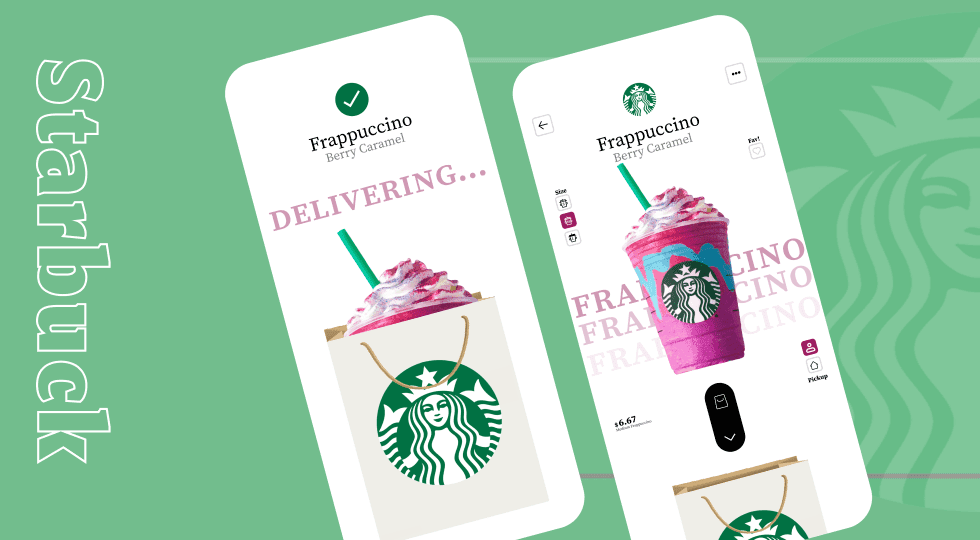
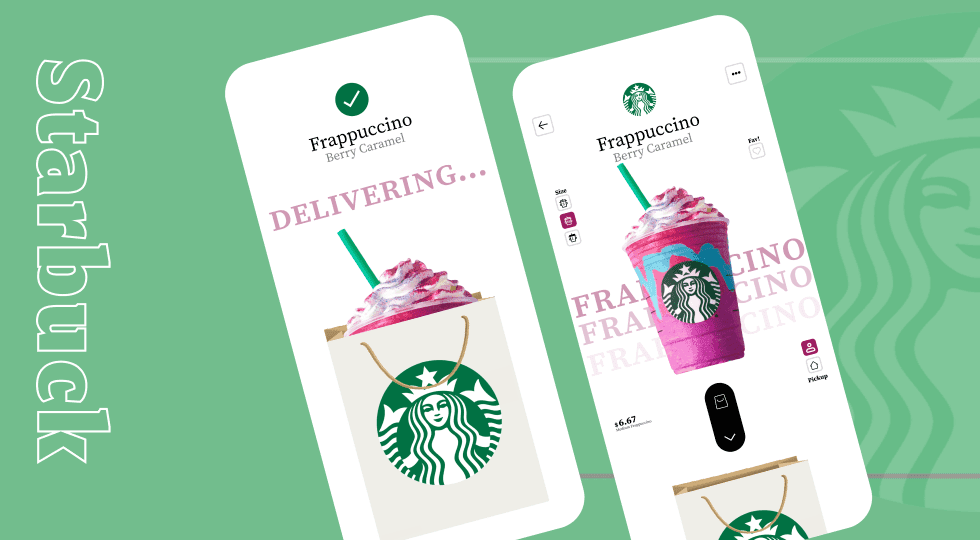
The main screen showcases the Frappuccino with customization options such as drink size and favorite selection.

The delivery confirmation screen introduces a playful interaction where the drink appears inside a branded bag while displaying the delivery status.

Visual Design & Key Screens 1

6. Interaction & Learnings

Interaction Design

Size selection buttons allow users to quickly customize their drink without leaving the product screen.

The ordering flow includes a playful delivery animation where the drink is placed into a branded bag, providing visual feedback that the order is being processed.

Minimal interface elements reduce friction and keep the interaction focused on the product.

Key Learnings

This project reinforced the importance of product-centric design in food and beverage applications.

Using large visuals combined with minimal interface elements can create a more engaging and intuitive ordering experience.

7. Figma Prototype Embed